
What Should a Small Business Automate First?
Anthony Wentzel
Founder, Pineapples
What Should a Small Business Automate First?
Start with one high-friction process you already run every week, not a full transformation. Good first picks are invoice follow-up, support triage, sales follow-up, scheduling, or recurring reporting. The process should have a clear owner, live in tools you already use, and fail in a way a person can catch. Automate that path first.
That is the whole decision. The rest of this page is how to make it without guessing, and without treating AI as a second job.
What should I automate first in my business?
Pick the process that already has volume, a visible miss, and a person who owns the outcome.
A useful first automation is usually boring. Someone copies a number from one system into another. Someone reads an inbox and sorts it. Someone sends the same follow-up with a few fields changed. Someone builds the same weekly report from three exports.
Those jobs are good first targets because they already have a happy path. You can describe the start, the finish, and the exception. If you cannot describe those three things in one sitting, you do not have a first automation yet. You have a research project.
A simple scorecard helps:
- It happens every week. Daily is better. Monthly can wait.
- A person already owns it. If nobody is accountable, the workflow will stall on the first exception.
- The input already exists. Email, a sheet, a CRM record, a form, a Slack channel. Do not invent a new system of record on day one.
- The miss is expensive or embarrassing. A late invoice, a lead that went cold, a ticket that sat too long, a report that arrived after the meeting.
- A human can still catch a bad output. The first workflow should have an approval step where it matters.
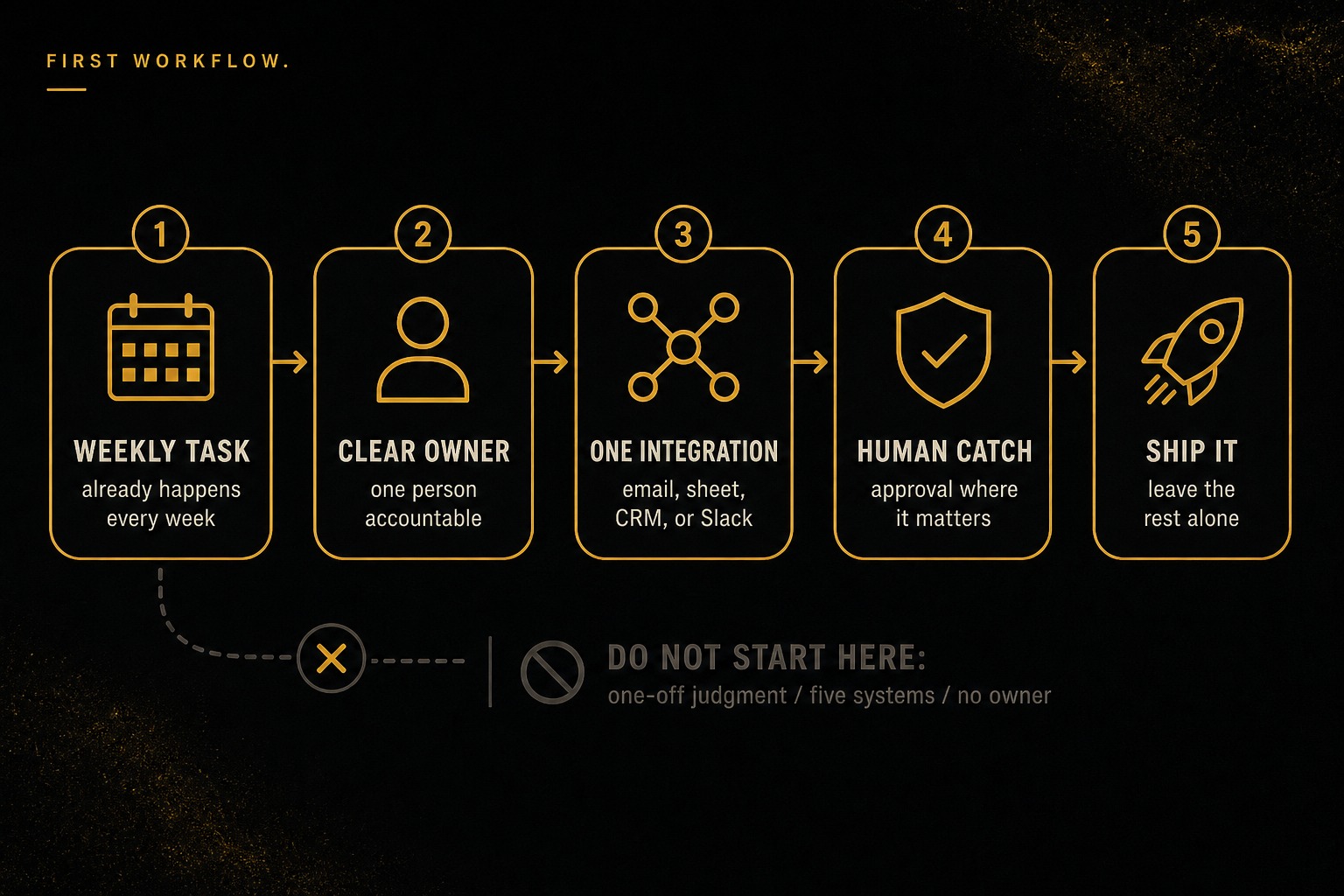
The diagram is how we pick the first workflow: weekly task → owner → one integration → human catch → ship. Do not start with one-off judgment, five systems, or no owner.
If two processes tie, pick the one you can ship with a single integration. One mailbox, one sheet, one CRM, or one Slack channel. That constraint is how you keep the first project honest.
This is the same "one workflow, then measure" idea in our AI workflow automation guide, written there for larger financial-services teams. The owner version is narrower. You are not standing up a 90-day program. You are naming one process and making it run without you.
Which work should I leave alone for now?
Do not start with the work that makes you feel modern. Start with the work that already has a defined path.
Leave these for later:
- One-off judgment. Pricing a custom job, negotiating a contract, hiring a person. AI can draft. A person should still decide.
- A process nobody can draw. If three people describe three different flows, fix the operating definition first.
- Anything that needs five systems on day one. That is an integration program, not a first automation. See our AI integration services guide when you are ready to connect a larger stack.
- Work with no owner. Automation without an owner becomes a silent failure.
- A full rebuild of your software. If the real problem is that the tools do not fit the business, that is a custom software question, not a first Zap.
A useful rule: if the failure mode is "someone has to reread a draft," you can automate. If the failure mode is "the customer gets the wrong outcome and you find out next week," keep a person in the loop or pick a different first process.
How much does business automation cost?
Price the first workflow as a fixed, finished thing. Do not price a vague "AI initiative."
Pineapples publishes first-party numbers for that first step. The Starter Workflow Pilot is $4,900 fixed, 7 business days from kickoff. You get:
- a 45-minute kickoff to pick the one process
- one production workflow with a single integration (email, sheets, CRM, or Slack)
- human-in-the-loop approval where it matters
- a Loom walkthrough and a simple runbook
- 100% of the fee credited toward a Build within 30 days
That is the offer we point owners to from chat. It is one process shipped as proof, not a discovery deck.
If you already know the workflow and want a fuller production build, the first-party next step is an Agentic Workflow Build at $18K or $35K per workflow, typically 2-4 weeks depending on integrations. Scoping is included. After something is live, a Workflow Ops Retainer is $6,500 per month if you want the agents operated and extended instead of hiring a full-time automation lead.
Those are the only cost numbers this page uses. If a vendor quotes a wide "it depends" range with no deliverable, ask them to name one process, one integration, and a date you can watch it run.
If you want a hours-and-dollars sketch from your own volume and wage rates before you buy, use the automation ROI calculator. It is a model, not a promise.
DIY cost is mostly your time. A weekend with a connector tool is cheap if you will maintain it. It is expensive if you become the unofficial owner of a brittle zap that only you can debug.
Should I use DIY tools or hire an AI automation agency?
This is the build vs buy question at owner scale.
Use DIY tools when:
- the path is linear (if this, then that)
- you or someone on the team will maintain the connections
- a missed step is easy to see and reverse
- you are testing whether the process is even worth keeping
Connector tools and a careful ChatGPT habit can cover a surprising amount of copy-paste. The limit shows up when the workflow needs memory, an approval gate, or a clean handoff when you are not in the room.
Use a scoped agency or pilot when:
- you need the workflow live in your real stack, not in a demo account
- the first integration is email, sheets, CRM, or Slack, and you want it done in days
- someone besides you has to run it next month
- you want a runbook, not a pile of undocumented automations
If you are still comparing categories of tools (orchestration, integrations, AI steps, observability), the mid-market AI workflow automation tools guide is a useful map. For a first owner project, do not buy the whole map. Buy or build one path.
A hybrid is normal. Keep the simple routing in a tool you already pay for. Put the messy judgment, the approval, and the customer-facing output in a workflow someone designed on purpose.
If the choice you are actually making is more hours from a virtual assistant versus a workflow, start with hiring a VA vs AI automation. A person is still the right first move when the process is messy and changing. A workflow is the right first move when the same path already repeats and you can write the steps down.
The agency-vs-DIY question is not "which brand of AI is smarter." It is "who owns the failure when the workflow is wrong on a Tuesday."
How do I know the first workflow is working?
Decide the scoreboard before kickoff. Otherwise "it works" means "it did not crash this morning."
Pick 3 numbers you can already count by hand:
- Cycle time. Intake to done. Invoice sent, ticket closed, follow-up delivered, report in the inbox.
- Manual touches. How many times a person has to copy, paste, or chase.
- Misses. Late items, dropped leads, tickets that aged out, reports that needed a rewrite.
Write the current number down. Then write the number you would accept after one week of live use. If you cannot name both, you are not ready to automate. You are ready to watch the process for a week.
After it is live, keep a person on the exceptions. The first workflow should make the happy path boring and make the weird cases louder, not quieter. If exceptions disappear into a black box, turn the automation off until you can see them again.
When the first path is stable, the next automation is easier to choose. You already know how you pick, how you measure, and how you hand off. That is the compounding part. The first project is still just one process.
What does a first week look like?
If you want the Pilot shape, the week is short on purpose.
Kickoff. You name the process. Not "operations," not "AI for the business." One path. One owner. One integration.
Build. The workflow is connected to a system you already use. Approvals sit where a wrong output would cost money or trust.
Handoff. You get a Loom and a runbook. Someone on your team can explain what it does without calling the builder.
That is enough to decide whether a larger Build is worth it. The Pilot fee credits 100% toward that Build within 30 days if you keep going.
If you are not ready to buy, start in chat. Describe the weekly process that bothers you most. The panel is there to help you name it. The priced next step, when you want one, is on the offers strip: Starter Workflow Pilot, $4,900, 7 business days.
Do not automate your business. Automate the one job you already hate doing twice.
Frequently asked questions
What should I automate first in my small business?
Start with one weekly process that already has a clear owner, lives in tools you use today, and fails in a way a person can catch. Invoice follow-up, support triage, sales follow-up, scheduling, and recurring reporting are common first picks. Leave one-off judgment work and anything without a defined happy path for later.
How much does business automation cost?
Pineapples prices a Starter Workflow Pilot at $4,900 fixed, delivered in 7 business days. That ships one production workflow with a single integration, human-in-the-loop approval where it matters, a Loom walkthrough, and a simple runbook. If you later want a fuller production build, the pilot fee credits 100% toward an Agentic Workflow Build within 30 days.
Is an AI automation agency better than DIY tools?
DIY tools are enough when the path is simple, you can maintain it, and a missed step is easy to fix by hand. A scoped pilot is the better first move when you need a production workflow connected to email, sheets, CRM, or Slack, with approvals and a handoff your team can run. The choice is about ownership and failure modes, not about buying more software.
How fast can a first automation go live?
A Starter Workflow Pilot is scoped to 7 business days from kickoff. The kickoff picks one process, then the work is one live workflow, not a roadmap deck. If the process is still fuzzy, start in chat and name the workflow before you buy.
Working a live deal?
Book a 30-minute working session.
Same operator who runs the diligence engagements. No SDRs, no sales team. Bring the target, I'll bring the checklist.
Share this article
Anthony Wentzel
Founder, Pineapples
Anthony Wentzel has spent 26 years helping mid-market operators turn technology friction into concrete decisions about systems, ownership, cost, and speed.